
fireworks-ai-tools-memory
Persistent experience memory for AI tools, CLI workflows, and reusable scripts.
This project extends the memory idea beyond skills and focuses on the messier operational layer: tools, toolchains, auth quirks, proxy rules, fallback paths, and scripts that already paid their tuition once.
中文文档 · MIT License

Natural-Language Installation
If you mainly work through Codex, the most natural install flow is to ask for it directly instead of starting from shell commands:
Install fireworks-ai-tools-memoryAdd fireworks-ai-tools-memory to my current Codex environmentMake this a shared skill so all my Codex accounts can use it
The command-line path is just the fallback:
npx skills add yizhiyanhua-ai/fireworks-ai-tools-memory
If you already cloned the repository locally, you can also bootstrap it with:
Common Natural-Language Requests
This skill is most useful when you want to stop relearning the same tool pain:
Inject the yt-dlp+mpv lessons before we startRemember what went wrong with ncm-cli this timeStore this script in the tool memory libraryWarn me about Spotify CLI auth pitfalls next timeFlush the tool lessons from this session
Typical CLI commands underneath:
python3 cli/tools_memory.py inject --tool yt-dlp+mpv
python3 cli/tools_memory.py checkpoint --tool ncm-cli --note "Search may work while playback still fails."
python3 cli/tools_memory.py flush --tool spotify-cli --summary-file ./session-summary.md
python3 cli/tools_memory.py register-script --tool yt-dlp+mpv --source ./scripts/play_mix.sh --name play-mix
python3 cli/tools_memory.py list-scripts --tool yt-dlp+mpv
python3 cli/tools_memory.py export-script --tool yt-dlp+mpv --name play-mix --dest /tmp/play_mix.sh
Why Build This
fireworks-skill-memory solves one problem well: skill-scoped experience.
But a lot of expensive repetition does not happen at the skill layer.
It happens at the tool layer:
- one CLI searches correctly but cannot actually play
- another tool authenticates halfway then dies on callback behavior
- a daemon only works with home-directory symlinks, not external volume paths
- a script already solved the issue once, but nobody remembers where it is
Those are not “prompting mistakes.”
They are operational lessons.
fireworks-ai-tools-memory exists to store them explicitly.
More bluntly: many failures are not model failures. They are tool-reality failures. Auth, proxies, path quirks, media rights, background daemons, callback URLs, process cleanup, and argument order all have to be remembered somewhere durable.
What It Covers
- Tool-specific pitfalls
- Best-practice invocation sequences
- Fallback chains
- Proxy and environment requirements
- Reusable scripts worth saving
- Cross-session tool playbooks for Codex or Claude Code
Technical Principles
The project does three plain but necessary things:
- It changes the memory unit from “skill” to “tool key”
The point is to remember ncm-cli, spotify-cli, or yt-dlp+mpv, not just a prompt shape.
- It turns temporary session pain into structured files
CHECKPOINTS.md keeps raw field notes, KNOWLEDGE.md keeps reusable lessons, and SCRIPTS.md plus scripts/ preserve working assets.
- It closes the loop across sessions
inject before work, checkpoint during work, flush after work, and register-script when a fix deserves to survive.
1. Overall architecture
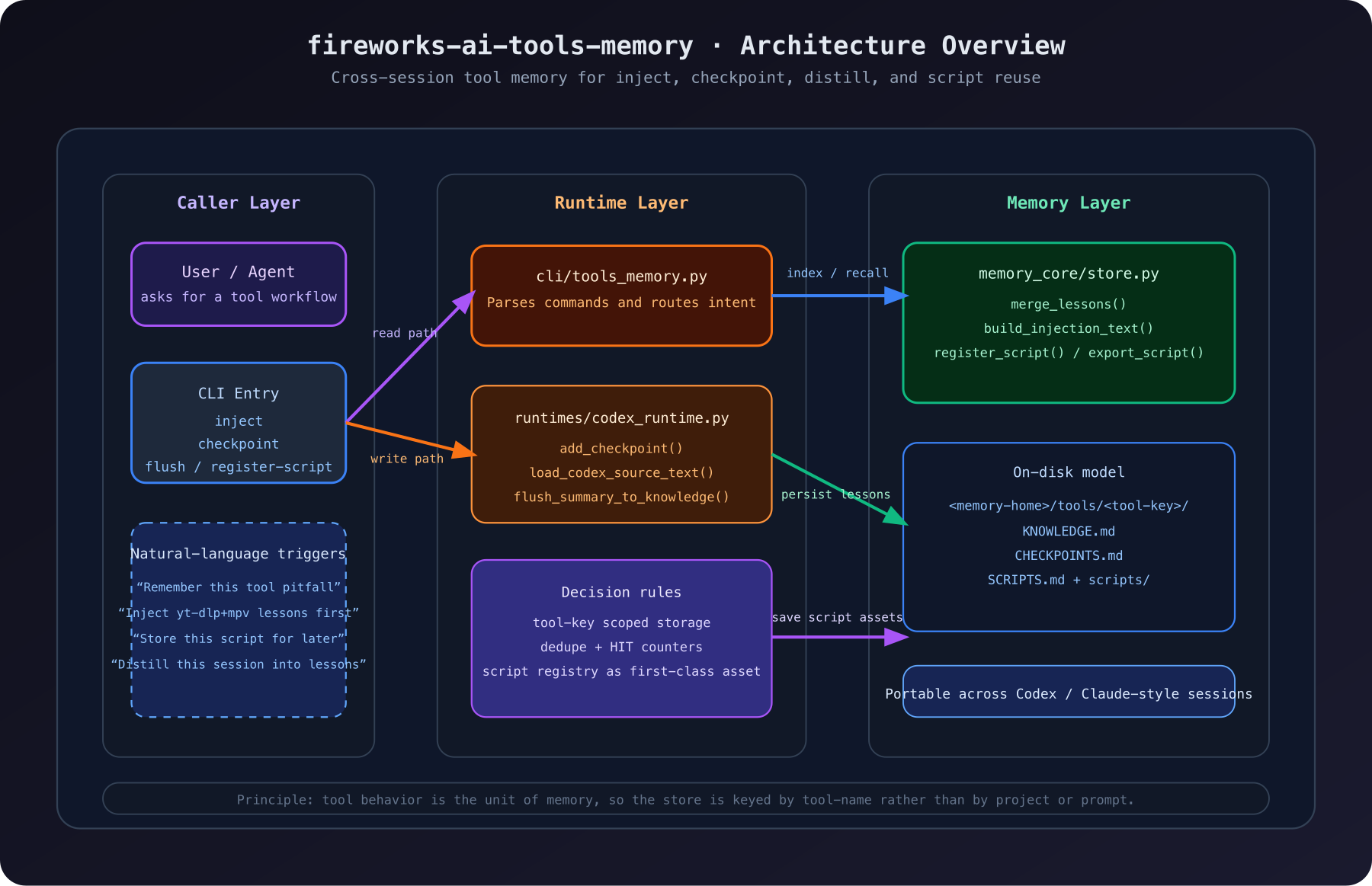
This diagram shows the core split:
- the caller layer expresses intent but does not own memory
- the CLI and runtime route intent into concrete operations
- the store layer persists lessons, checkpoints, and scripts
- the stable memory object is the
tool-key, not the repo or a one-off prompt
2. How a real task becomes future guidance
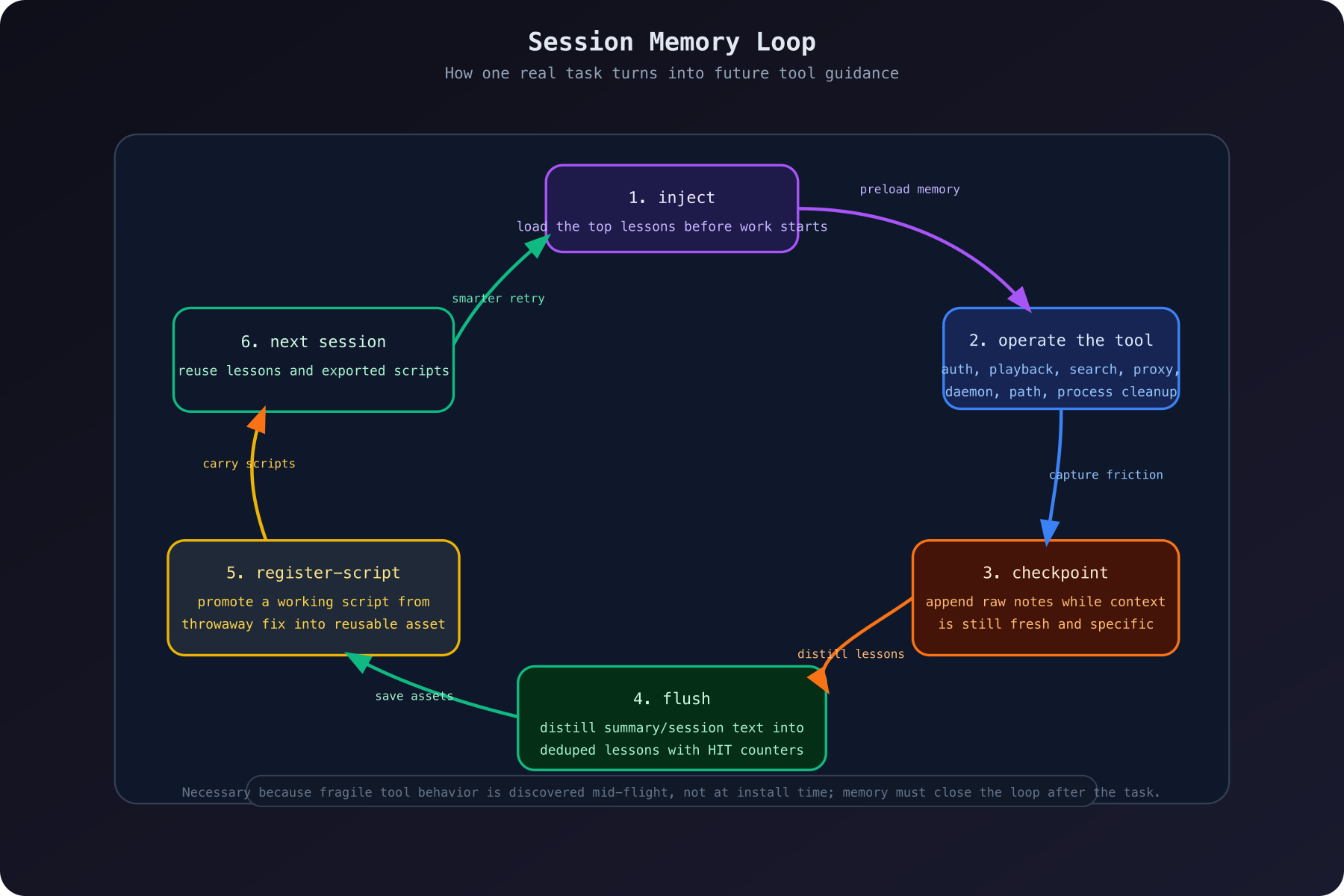
The important part happens during real work, not at install time:
inject reloads prior lessons before a task beginscheckpoint captures raw friction while the details are still freshflush distills reusable lessons from a summary or session recordregister-script promotes a working fix into a durable asset
That is why this project is necessary. Toolchain failures usually show up mid-flight, and by the end of a session the specific details are often gone.
3. Why it must stay separate from fireworks-skill-memory
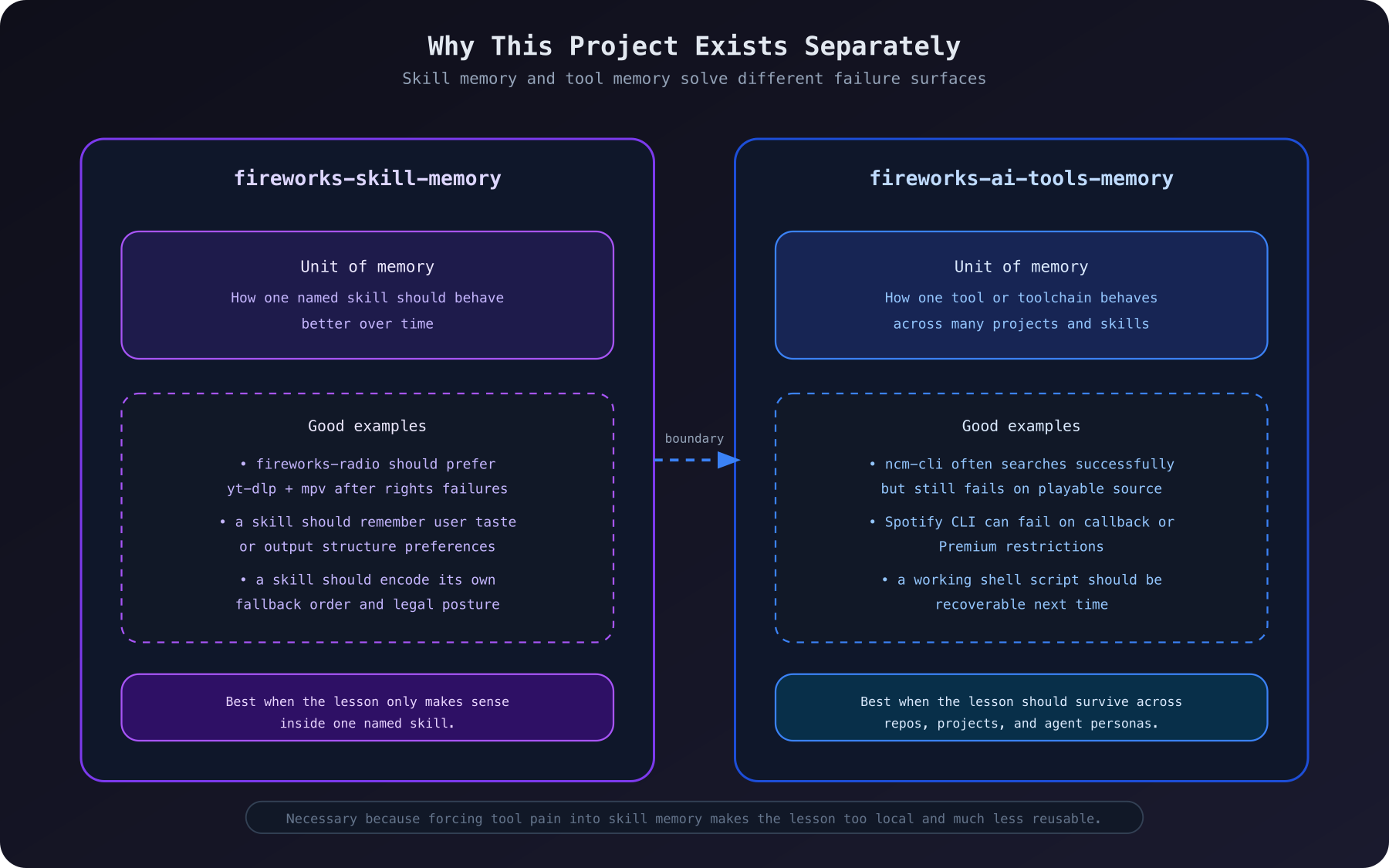
This separation is not aesthetic; it protects reuse:
fireworks-skill-memory should remember a named skill's strategy, preferences, and output behaviorfireworks-ai-tools-memory should remember cross-skill tool behavior, failure patterns, and scripts
If tool pain gets forced into skill memory, the lesson becomes too local and much less reusable.
Storage Model
<memory-home>/
├── global/KNOWLEDGE.md
└── tools/
    └── <tool-key>/
        ├── KNOWLEDGE.md
        ├── CHECKPOINTS.md
        ├── SCRIPTS.md
        └── scripts/
            └── <saved-script>
Tool Keys
Use stable keys such as:
ncm-clispotify-cliyt-dlp+mpvlark-clipaseobrowser-use
Codex Workflow
Inject memory before a task
python3 cli/tools_memory.py inject --tool yt-dlp+mpv
Save a checkpoint during work
python3 cli/tools_memory.py checkpoint \
  --tool ncm-cli \
  --note "Search may work while playback still fails because the song has no playable source."
Distill lessons after a session
python3 cli/tools_memory.py flush \
  --tool spotify-cli \
  --summary-file ./session-summary.md
Save a reusable script
python3 cli/tools_memory.py register-script \
  --tool yt-dlp+mpv \
  --source ./scripts/play_mix.sh \
  --name play-mix \
  --description "Start a short coding mix through mpv."
List and export saved scripts
python3 cli/tools_memory.py list-scripts --tool yt-dlp+mpv
python3 cli/tools_memory.py export-script \
  --tool yt-dlp+mpv \
  --name play-mix \
  --dest /tmp/play_mix.sh
What Makes It Different
This is not a generic notes bucket.
It is opinionated:
- Tool memory should be keyed by the actual runtime object that fails
- Lessons should be short, operational, and reusable
- Fallbacks are first-class knowledge
- Scripts are assets, not side notes
Relationship to fireworks-skill-memory
fireworks-skill-memory: remember how to use a skill betterfireworks-ai-tools-memory: remember how to operate tools better
They are complementary, not redundant.
Repository Assets
fireworks-ai-tools-memory/
├── assets/
│   └── images/
│       ├── fireworks-ai-tools-memory-icon.png
│       └── fireworks-ai-tools-memory-landing.png
├── docs/
│   └── diagrams/
│       ├── architecture-overview.svg
│       ├── architecture-overview.png
│       ├── session-memory-loop.svg
│       ├── session-memory-loop.png
│       ├── skill-boundary.svg
│       └── skill-boundary.png


